Add on Info/location on Plans

Sean Cargal
A suggestion...
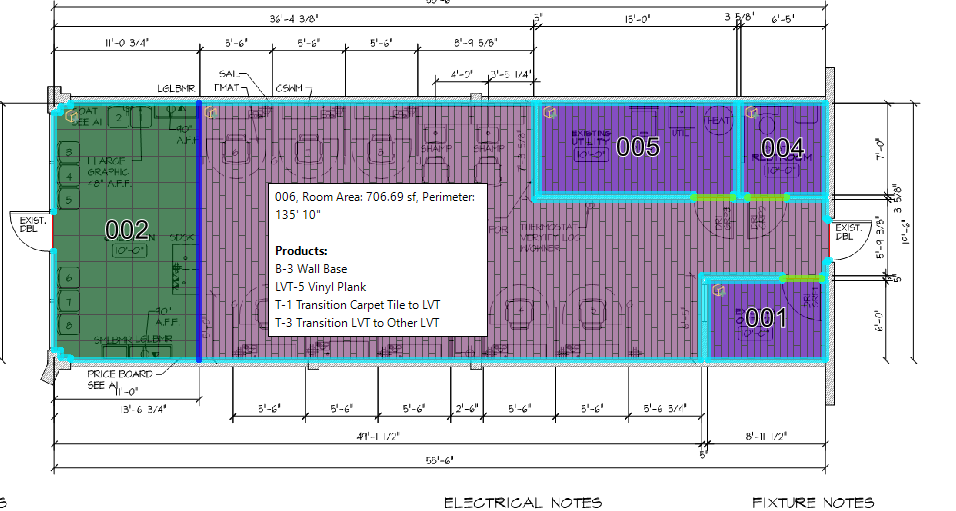
Let's give RFMS Measure a printing option were it places text or text boxes listing Add ons into each room on plans. As you know placement and/or locations of some Add ons are hidden on plans. This will help those that do not have access to RFMS Measure like installers, coordinators, general contractors, etc.
I understand some of the challenges will be text size, room size, number of Add ons, and so on.
The image below shows an image of RFMS Measure with a Tooltip box. This Tooltip box makes a good starting point and example of what it could look like.
Thanks.
Comments
It seems like maybe you dont have your ( Show add-ons ) selected , depending one which type of plan you are printing click the settings button ( hammer and wrench )
Select ( Show add-ons )
The addons then are shown w/ the color of the material you have selected
The "Show add-ons in legend" option is good, but excluding the legend, some add-ons (e.g., underlayments and adhesives) are not shown on the plan and/or are not noted which rooms receive it. When a third party installer/gc receives a pdf or hardcopy RFMS Measure Seam Plan it is unclear which add-ons go into which rooms.
Please sign in to leave a comment.