Open Cloud Project: All filters to help find projects quicker

Josh Penny
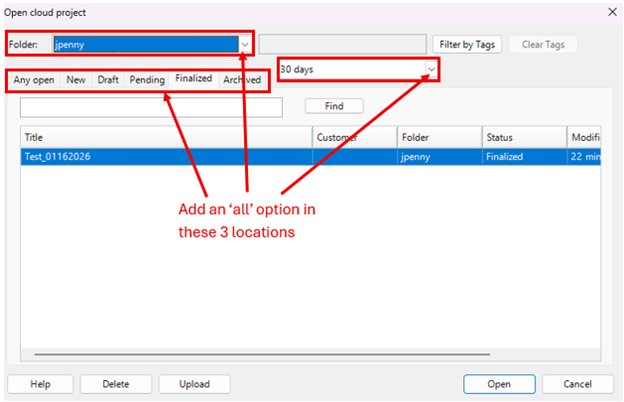
Having MANY files saved to the cloud storage, we often find it difficult to locate files quickly. This is due to (3) reasons: 1) the 'timeframe' selection filter (30 days, 60 days, 90 days, & years....) not having an 'all' option, 2) The 'tabs' selection requirement not having an 'all' option, & 3) The lack of an 'all' option on the 'Folder' dropdown. If there was an 'all' option in each of these areas, we could search all folders, timeframes, project status with the 'Find' option. The RFMS Online Services website allows to search by 'All' folders, without a date requirement, & no project status requirement, which is very quick and easy to find projects.
Comments
Please sign in to leave a comment.